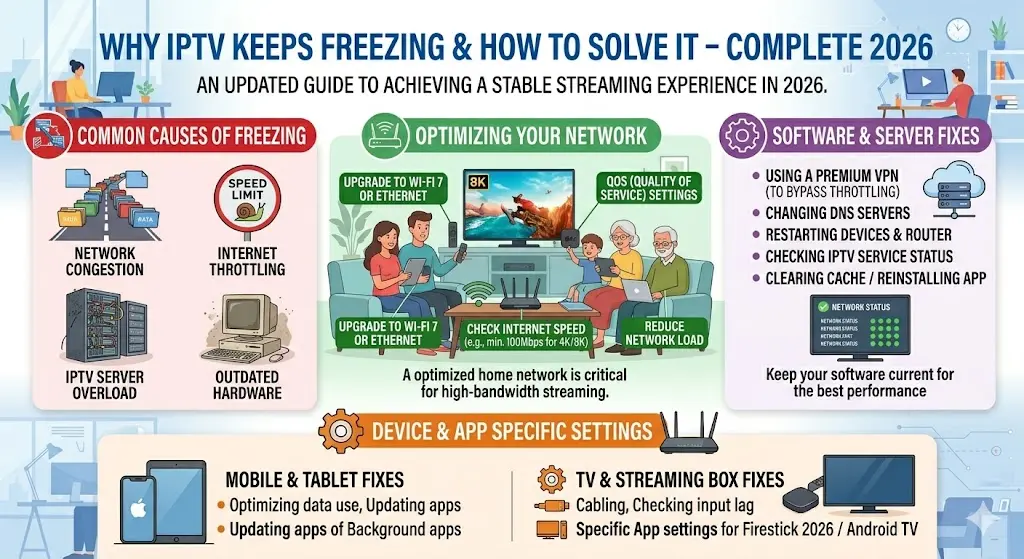
There’s nothing more frustrating than settling in to watch your favorite live football match, movie premiere, or late-night series binge—only for your IPTV stream to freeze right when things get exciting.
In 2026, IPTV has become one of the most popular ways to enjoy live TV, sports, movies, and on-demand entertainment in both the UK and USA. It offers flexibility, better device compatibility, and a more personalized viewing experience than traditional cable. But one common issue still annoys many users: freezing and buffering.
The good news is that IPTV freezing is usually caused by a few very specific issues, and most of them can be fixed quickly without advanced technical knowledge.
This guide explains why IPTV keeps freezing, what causes buffering, and the best ways to solve it permanently, all in a clear and engaging way.
What Does IPTV Freezing Actually Mean?
IPTV freezing happens when the video suddenly pauses, buffers, or lags while the audio may continue or stop completely. Sometimes the channel takes too long to load, while in other cases the stream works for a few minutes and then starts stuttering.
This problem usually appears in:
- live sports
- HD and 4K channels
- peak evening hours
- crowded home networks
- unstable Wi-Fi zones
- low-quality IPTV apps
The freezing itself is not always caused by the IPTV provider. In many cases, the real issue comes from the internet connection, the streaming device, or the home network setup.
Understanding the exact reason is the first step toward solving it.
1) Slow Internet Speed
The most common reason IPTV freezes is insufficient internet speed.
Many users assume that if the internet works for browsing and social media, it should also work perfectly for streaming. But IPTV requires a much more stable and consistent connection.
As a general guide:
- SD streaming needs around 5 Mbps
- HD streaming works best at 10–15 Mbps
- 4K IPTV often needs 25 Mbps or more
- multiple devices require additional bandwidth
If several family members are gaming, downloading, or streaming at the same time, the available speed for IPTV drops quickly.
How to Fix It
- run a speed test
- upgrade to a faster internet package
- pause background downloads
- disconnect unused devices
- reduce 4K streaming on slower plans
A stable connection matters more than advertised speed.
2) Weak Wi-Fi Signal
A strong internet plan does not always mean a strong connection at the TV.
One of the biggest hidden reasons IPTV freezes is poor Wi-Fi signal strength between the router and the streaming device.
This is especially common when:
- the TV is far from the router
- walls block the signal
- the device is on another floor
- too many devices use the same Wi-Fi band
The result is unstable data delivery, which causes buffering and sudden pauses.
How to Fix It
- move the router closer
- use a Wi-Fi extender
- switch to 5GHz Wi-Fi
- reduce wall interference
- place the router in an open area
Even small router placement changes can dramatically improve streaming.
3) Use Ethernet Instead of Wi-Fi
If IPTV freezing happens often during sports or HD movies, the best solution is usually wired Ethernet.
Wi-Fi is convenient, but Ethernet provides:
- lower latency
- more stable speed
- less interference
- smoother 4K playback
- better peak-time performance
For smart TVs, Android boxes, Fire TV devices with adapters, and IPTV boxes, Ethernet often solves freezing instantly.
This is one of the most effective fixes available.
4) IPTV Server Overload
Sometimes the issue is not your internet at all.
During major sports events, evening movie hours, or trending live broadcasts, IPTV servers can become overloaded. When too many users connect at once, the stream may freeze or constantly buffer.
This is especially noticeable during:
- football finals
- UFC main events
- NFL playoffs
- popular movie premieres
- weekend evenings
How to Fix It
- switch to another stream source
- lower video quality temporarily
- restart the channel
- try a backup playlist
- use a better IPTV provider
Reliable providers usually handle traffic spikes much better.
5) Outdated IPTV App or Device
Many users forget that the app itself may be the problem.
Older IPTV apps can develop issues like:
- memory leaks
- slow channel loading
- codec problems
- poor cache management
- outdated player compatibility
Likewise, older streaming devices may struggle with modern HD and 4K streams.
How to Fix It
- update the IPTV app
- restart the device
- clear app cache
- reinstall the app
- update Firestick/Android TV software
- close background apps
A clean app installation often improves performance immediately.
6) Too Much Cached Data
Over time, IPTV apps collect temporary files and old channel data.
Too much cache can cause:
- freezing
- lag
- failed playback
- black screens
- slower navigation
How to Fix It
Clear the cache regularly:
- go to app settings
- select storage
- clear cache
- restart the app
- reload the playlist
This simple step is often overlooked but highly effective.
7) VPN or DNS Issues
Some users stream IPTV through a VPN for privacy or region access. While this can be useful, a slow VPN server can easily cause freezing.
Common issues include:
- overloaded VPN servers
- distant server locations
- poor DNS response
- unstable routing paths
How to Fix It
- switch to a nearby VPN server
- test without VPN
- use faster DNS settings
- restart the VPN app
- choose a streaming-optimized server
The wrong VPN location can add major delay.
8) Device Overheating
Streaming devices that run for long hours may overheat.
This often causes:
- lag
- random freezing
- app crashes
- delayed remote response
How to Fix It
- restart the device
- improve airflow
- avoid enclosed cabinets
- unplug unused USB accessories
- clean dust around vents
Overheating is common in older streaming sticks.
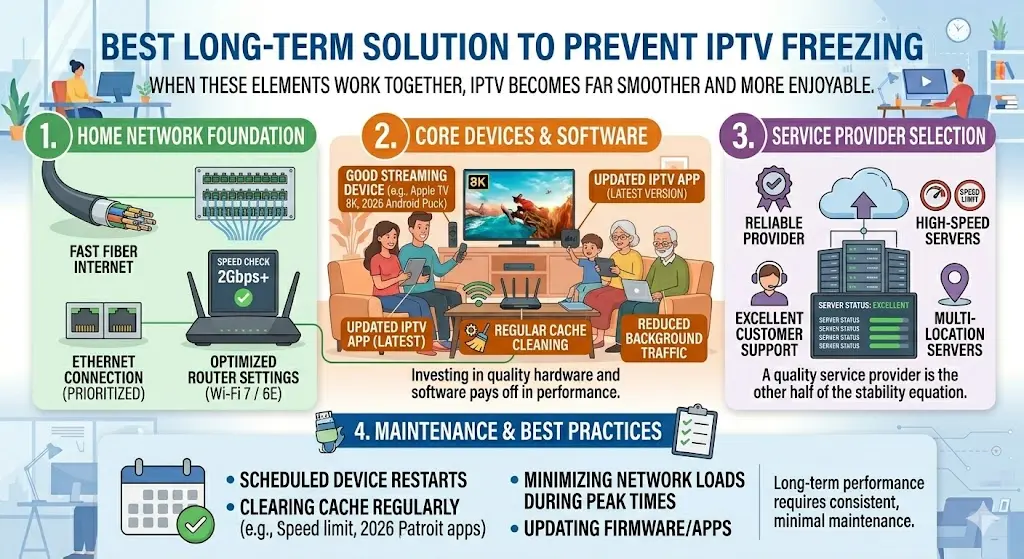
Best Long-Term Solution to Prevent IPTV Freezing
If freezing keeps happening, the best long-term setup includes:
- fast fiber internet
- Ethernet connection
- updated IPTV app
- good streaming device
- reliable provider
- regular cache cleaning
- reduced background traffic
When these elements work together, IPTV becomes far smoother and more enjoyable.
Final Thoughts
IPTV freezing is frustrating, but it is almost always fixable.
In most cases, the issue comes from:
- slow internet
- weak Wi-Fi
- overloaded servers
- outdated apps
- excessive cache
- device overheating
- VPN delays
The best way to solve IPTV buffering permanently is to improve your network stability first, then optimize the app and device.
Once everything is configured properly, IPTV can deliver smooth sports, movies, and live TV without interruptions.
A better connection, better setup, and better provider choice make all the difference in 2026.
About the Author